Tutorial on @snoop_inference
Inference may occur when you run code. Inference is the first step of type-specialized compilation. @snoop_inference collects data on what inference is doing, giving you greater insight into what is being inferred and how long it takes.
Compilation is needed only for "fresh" code; running the demos below on code you've already used will yield misleading results. When analyzing inference, you're advised to always start from a fresh session. See also the comparison between SnoopCompile and JET.
Add SnoopCompileCore, SnoopCompile, and helper packages to your environment
Here, we'll add these packages to your default environment. (With the exception of AbstractTrees, these "developer tool" packages should not be added to the Project file of any real packages unless you're extending the tool itself.)
using Pkg
Pkg.add(["SnoopCompileCore", "SnoopCompile", "AbstractTrees", "ProfileView"]);
Setting up the demo
To see @snoop_inference in action, we'll use the following demo:
module FlattenDemo
    struct MyType{T} x::T end

    extract(y::MyType) = y.x

    function domath(x)
        y = x + x
        return y*x + 2*x + 5
    end

    dostuff(y) = domath(extract(y))

    function packintype(x)
        y = MyType{Int}(x)
        return dostuff(y)
    end
end

# output

Main.var"Main".FlattenDemo
The main call, packintype, stores the input in a struct, and then calls functions that extract the field value and performs arithmetic on the result.
Collecting the data
To profile inference on this call, do the following:
julia> using SnoopCompileCore

julia> tinf = @snoop_inference FlattenDemo.packintype(1);

julia> using SnoopCompile

julia> tinf
InferenceTimingNode: 0.000007/0.005233 on Base.Compiler.Timings.ROOT() with 1 direct childrenDon't omit the semicolon on the tinf = @snoop_inference ... line, or you may get an enormous amount of output. The compact display on the final line is possible only because SnoopCompile defines nice Base.show methods for the data returned by @snoop_inference. These methods cannot be defined in SnoopCompileCore because it has a fundamental design constraint: loading SnoopCompileCore is not allowed to invalidate any code. Moving those Base.show methods to SnoopCompileCore would violate that guarantee.
This may not look like much, but there's a wealth of information hidden inside tinf.
A quick check for potential invalidations
After running @snoop_inference, it's generally recommended to check the output of staleinstances:
julia> staleinstances(tinf)
SnoopCompileCore.InferenceTiming[]
If you see this, all's well. A non-empty list might indicate method invalidations, which can be checked (in a fresh session) using the tools described in Tutorial on @snoop_invalidations.
If you do have a lot of invalidations, precompile_blockers may be an effective way to reveal those invalidations that affect your particular package and workload.
Viewing the results
Let's start unpacking the output of @snoop_inference and see how to get more insight. First, notice that the output is an InferenceTimingNode: it's the root element of a tree of such nodes, all connected by caller-callee relationships. Indeed, this particular node is for Base.Compiler.Timings.ROOT(), a "dummy" node that is the root of all such trees.
You may have noticed that this ROOT node prints with two numbers. It will be easier to understand their meaning if we first display the whole tree. We can do that with the AbstractTrees package:
julia> using AbstractTrees

julia> print_tree(tinf, maxdepth=100)
InferenceTimingNode: 0.000007/0.005233 on Base.Compiler.Timings.ROOT() with 1 direct children
└─ InferenceTimingNode: 0.004478/0.005226 on Main.var"Main".FlattenDemo.packintype(::Int64) with 2 direct children
   ├─ InferenceTimingNode: 0.000205/0.000205 on Main.var"Main".FlattenDemo.MyType{Int64}(::Int64) with 0 direct children
   └─ InferenceTimingNode: 0.000200/0.000544 on Main.var"Main".FlattenDemo.dostuff(::Main.var"Main".FlattenDemo.MyType{Int64}) with 2 direct children
      ├─ InferenceTimingNode: 0.000183/0.000228 on Main.var"Main".FlattenDemo.extract(::Main.var"Main".FlattenDemo.MyType{Int64}) with 1 direct children
      │  └─ InferenceTimingNode: 0.000045/0.000045 on getproperty(::Main.var"Main".FlattenDemo.MyType{Int64}, ::Symbol) with 0 direct children
      └─ InferenceTimingNode: 0.000115/0.000115 on Main.var"Main".FlattenDemo.domath(::Int64) with 0 direct children
This tree structure reveals the caller-callee relationships, showing the specific types that were used for each MethodInstance. For example, getproperty(::MyType{Int64}, ::Symbol) corresponds to y.x in the definition of extract.
Generally we speak of call graphs rather than call trees. But because inference results are cached (a.k.a., we only "visit" each node once), we obtain a tree as a depth-first-search of the full call graph.
You can extract the MethodInstance with
julia> Core.MethodInstance(tinf)
MethodInstance for Base.Compiler.Timings.ROOT()

julia> Core.MethodInstance(tinf.children[1])
MethodInstance for Main.var"Main".FlattenDemo.packintype(::Int64)
Each node in this tree is accompanied by a pair of numbers. The first number is the exclusive inference time (in seconds), meaning the time spent inferring the particular MethodInstance, not including the time spent inferring its callees. The second number is the inclusive time, which is the exclusive time plus the time spent on the callees. Therefore, the inclusive time is always at least as large as the exclusive time.
The ROOT node is a bit different: it is a placeholder for the top of the tree, not a function that was inferred, so its exclusive time is negligible. Its inclusive time is the total for all the compilation recorded by @snoop_inference.
By default, both numbers also include the time LLVM spent generating native code for the MethodInstance; pass include_llvm=false to exclusive and inclusive to obtain the time for type-inference alone. In this demo, only packintype was compiled to native code (its callees were inlined into it), and native code generation accounts for most of its exclusive time. As you will quickly discover, inference takes much more time on more complicated code.
We can also display this tree as a flame graph, using the ProfileView.jl package:
julia> fg = flamegraph(tinf)
Node(FlameGraphs.NodeData(ROOT() at typeinfer.jl:75, 0x00, 0:10080857))
julia> using ProfileView
julia> ProfileView.view(fg)You should see something like this:
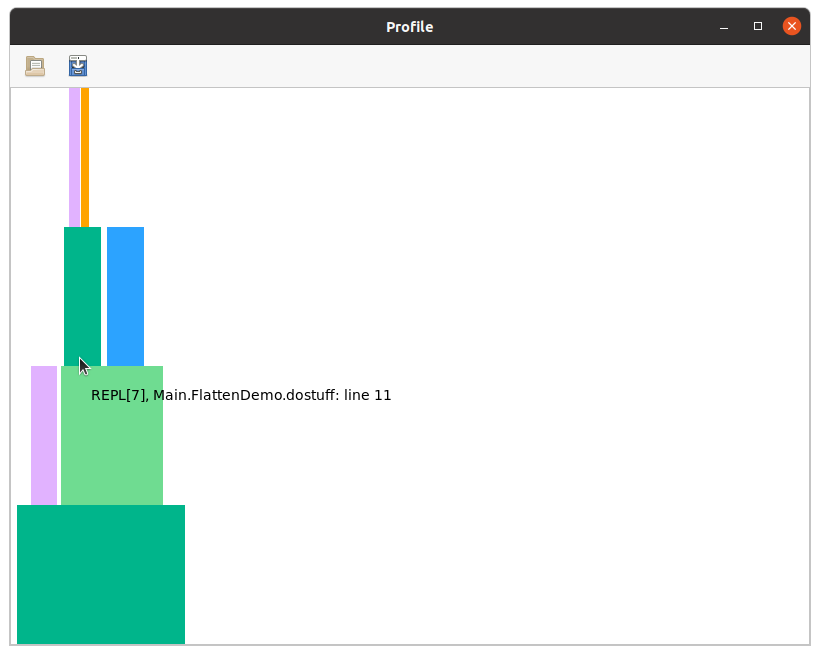
Users are encouraged to read the ProfileView documentation to understand how to interpret this, but briefly:
- the horizontal axis is time (wide boxes take longer than narrow ones), the vertical axis is call depth
- hovering over a box displays the method that was inferred
- left-clicking on a box causes the full
MethodInstanceto be printed in your REPL session - right-clicking on a box opens the corresponding method in your editor
- ctrl-click can be used to zoom in
- empty horizontal space above a box corresponds to that box's exclusive time, the time not spent on its callees
- any boxes colored red (there are none in this particular example, but you'll see some later) correspond to naively non-precompilable
MethodInstances, in which the method is owned by one module but the types are from another unrelated module. SuchMethodInstances are omitted from the precompile cache file unless they've been "marked" byPrecompileTools.@compile_workloador an explicitprecompiledirective. SeeSnoopCompile.isprecompilablefor further explanation and some examples.
You can explore this flamegraph and compare it to the output from print_tree.
Julia 1.12 and later do not record inference for specific constant values (constant propagation) as separate frames, so it cannot be identified in the tree or the flamegraph. It can still affect TTFX, and may cause compilation of something that you thought you had precompiled. For example, suppose your workload "exercises" myfun(args...; warn=true), so you might think you have myfun covered for the corresponding argument types. But constant-propagation results in (re)compilation for specific values: if Julia has decided that myfun merits constant-propagation, a call myfun(args...; warn=false) might need to be compiled separately.
When you want to prevent constant-propagation from hurting your TTFX, you have two options:
- precompile for all relevant argument values as well as types. The most common argument types to trigger Julia's constprop heuristics are numbers (
Bool/Int/etc) andSymbol. - Disable constant-propagation for this method by adding
Base.@constprop :nonein front of your definition ofmyfun. Constant-propagation can be a big performance boost when it changes how performance-sensitive code is optimized for specific input values, but when this doesn't apply you can safely disable it.
Finally, flatten, on its own or together with accumulate_by_source, allows you to get an sense for the cost of individual MethodInstances or Methods.
The tools here allow you to get an overview of where inference is spending its time. This gives you insight into the major contributors to latency.